| |
LiftPlanner guides you through a consistent, repeatable workflow:
1. Select Crane & Configuration
Choose the crane model, boom/jib setup, counterweight, and any special equipment. LiftPlanner automatically creates your chosen configuration.
2. Define Load & Rigging
Specify weight, dimensions, rigging method, and sling geometry. The system calculates angles, tensions, and load distribution as the rigging is placed.
3. Position Crane & Load
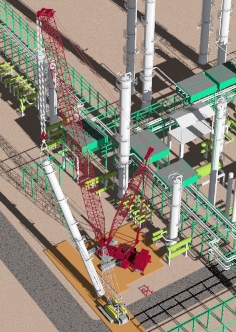
Place the crane on the site model, define the pick and set locations, and visualize the lift path.
4. Validate Capacity
LiftPlanner checks radius, boom angle and chart capacity at key points in the lift. |
 |
5. Generate Plan
Export a clean, professional lift plan with diagrams, geometry, and configuration details.
6. Crane Charts & Geometry Logic
LiftPlanner uses a strict interpretation of manufacturer charts. No shortcuts, no approximations.
- Chart values are tied directly to boom length, counterweight, and configuration
- Capacity is validated as the geometry and lift path changes
- Invalid configurations are blocked with clear warnings (boom angle, two block)
This ensures every lift plan reflects real-world crane behavior — not assumptions.
6. Rigging & Load Handling
LiftPlanner includes a complete rigging toolkit:
- Sling angle calculations
- Spreader bar modeling
- Multi-point pick logic
- Load center-of-gravity handling
The system shows how rigging choices affect radius, boom angle, and crane capacity.
8. Site Modeling & Obstructions
LiftPlanner lets you build a realistic site environment:
- Import CAD backgrounds
- Add buildings, tanks, pipe racks, or custom obstructions
- Define exclusion zones
- Visualize crane placement options
- Check clearances along the lift path
This eliminates surprises on lift day.
9. Output & Documentation
LiftPlanner produces clean, professional lift plans:
- Crane configuration summary
- Geometry tables
- Load path diagrams
- Rigging details
- Capacity validation
- Customer-ready visuals
Plans can be exported for internal review, customer approval, or regulatory compliance.
|
|